eGIRO
View the participating banks for Direct Debit Authorisation online application.
Last updated on 13 March 2026
Participating banks
Supported by the Monetary Authority of Singapore (MAS), eGIRO (electronic GIRO) is a joint initiative by the Association of Banks in Singapore (ABS) and the participating banks below for Direct Debit Authorisation online application:
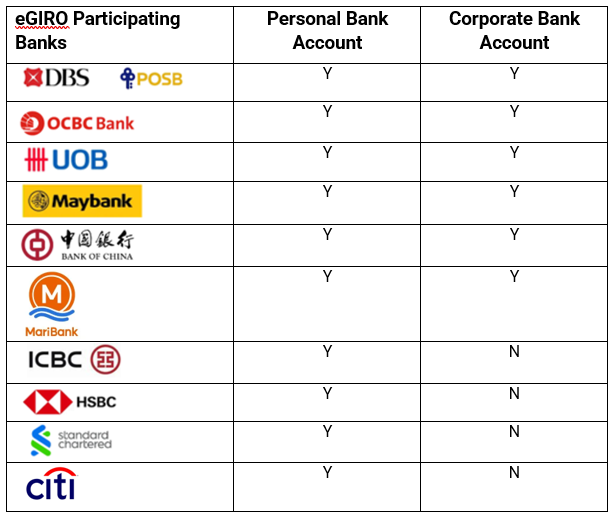
For bank account holders from non-participating banks, you will need to apply for Direct Debit Authorisation by submitting the original hardcopy Interbank GIRO form [PDF, 133 KB] (opens in new tab)to HSA. The processing time will take around 3 to 4 weeks.
Before applying for eGIRO
Before you can proceed with the eGIRO application, ensure that your Corppass Administrator has granted you access to the “HSA E-SERVICES: SINGAPORE HEALTH PRODUCT ACCESS AND REGULATION E-SYSTEM (SHARE)” via the Corppass portal (opens in new tab). Please refer to the step-by-step guide (opens in new tab).
Applying eGIRO using a Corporate Bank Account
Application steps using a Corporate Bank Account
Steps | Description |
|---|---|
Step 1 | Simply fill up the eGIRO registration page with the relevant details. You will be redirected to your selected Internet Banking Portal. |
Step 2 | Complete the application process via your selected bank portal. To avoid submitting a fresh application again, please ensure that you have completed the setup with your bank. |
Step 3 | Once submission is successful, ensure that the eGIRO request is authorised within 48 hours to complete your application (if applicable*). |
Step 4 | You will be redirected back to SHARE website to view the status of your application. The bank will notify you within 48 hours via email and/or SMS once the eGIRO application is processed. |
* Additional approval may be required from your authoriser(s) depending on your internet banking setup. If your company’s internet banking setup requires additional authoriser(s) to approve, please request for your authoriser(s) to approve within 48 hours from your eGIRO submission date and time. If it is not approved within 48 hours, please submit a new eGIRO application again as the original application will be invalid. Please contact your bank if you need further assistance. | |
Applying eGIRO using a Personal Bank Account
Application steps using a Personal Bank Account
Steps | Description |
|---|---|
Step 1 | Simply fill up the eGIRO registration page with the relevant details. You will be redirected to your selected Internet Banking Portal. |
Step 2 | Complete the application process via your selected bank portal. To avoid submitting a fresh application again, please ensure that you have completed the setup with your bank. |
Step 3 | You will be redirected back to SHARE website to view the status of your application. The bank will notify you within 48 hours via email and/or SMS once the eGIRO application is processed. |
For assistance, please contact us at HSA_AR_Payment@hsa.gov.sg.